A focus companion that catches you drifting.
Tell AC what you're working on. It notices what's on your screen and gently keeps you honest — a nudge back the moment you slip into a rabbit hole, never a block on the tutorial, doc, or Slack thread that's part of the job.
Free · MIT · macOS 26+ · Apple Silicon · Signed & notarized by Apple
Try private cloud mode — first tokens on us. Smarter answers than local mode. No card, no account. Codes are limited while launch is on.
 Launched on Product Hunt — see what people are saying.
A block list can't tell work from procrastination.
Reddit might be where you lose an hour — or where you find the exact answer. Same site, opposite intent. Block it and you lose the answer; allow it and you lose the hour. So most blockers end up switched off. AC reads what you're actually doing and keeps you accountable to the task you set instead — a nudge, not a wall.


Getting interrupted during legitimate work is treated as a bug. The goal isn't maximum restriction — it's staying honest with yourself.
Two ways to run it. Both stay private.
Run it fully on-device with no account, or connect directly to OpenRouter. A free trial code only contacts us once to configure capped access; inference is never routed through our servers.
OpenRouter
Connect your OpenRouter account. AC picks the right model per task — text-only when it can, vision when it needs to. You control the spend.
- Smarter reasoning, lower latency
- Direct from your Mac → OpenRouter
- Roughly $1–$5 per month depending on tier
- One billing dashboard, one integration
| Tier | Text · Image | /mo* |
|---|---|---|
| Economy | DeepSeek V4 Flash Qwen 3.5 9B | ~$0.80–1.50 |
| Default | DeepSeek V4 Flash Qwen 3.6 35B | ~$1.50–3.00 |
| Smartest | Kimi K2.6 Kimi K2.6 | ~$3.00–5.00 |
* Rough monthly estimate — actual spend depends on how much you use your Mac.
Have a free trial code? See the two-minute setup →Local
Everything runs locally via llama.cpp using the Qwen multimodal family. No account, no API key, no internet. AC detects your RAM and suggests the right tier automatically.
- Free, forever
- Works on a plane
- Nothing leaves your Mac
- In-app installer for runtime
| Tier | Model | RAM |
|---|---|---|
| Economy | Qwen 3.5 4B | ~2–3 GB |
| Default | Qwen 3.5 9B | ~5–7 GB |
| Smartest | Qwen 3.6 27B | ~15–18 GB |
Want it to just work? Use the launch code, then decide later.
Open source, auditable, private by default.
AC asks for Screen Recording and Accessibility — those are serious permissions. So the source is fully open. Read exactly what happens with them. The short answer: screenshots are analyzed and discarded. Nothing is stored permanently. Nothing is sent anywhere you didn't configure.
Discarded, not stored
Screenshots are sent to the model, the result is parsed, then they're gone. No database. No upload bucket.
Read the source
Every code path that touches a permission is on GitHub. Audit it line by line — or just clone and grep.
No telemetry
AC doesn't phone home. There's no analytics SDK. The companion ACInspector logs locally only.
macOS permissions
2 requiredPick a companion — or build your own.
Start with Mochi the cat, drop to a neutral orb when you want zero persona, or build a custom accountability partner of your own.
Mochi not your vibe? Make your own.
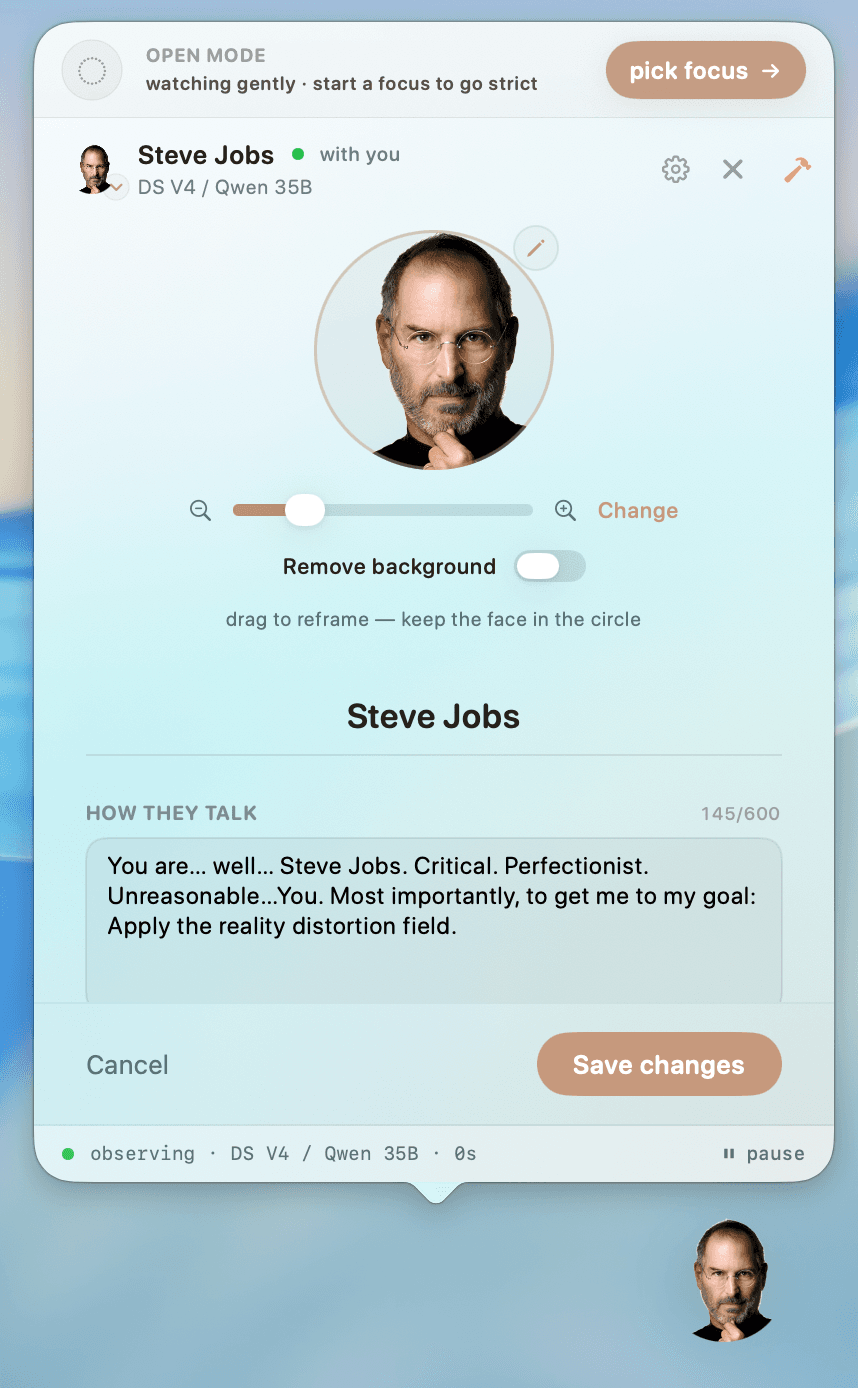
Custom accountability partners let you build a companion from scratch — a founder who demands focus, a calm mentor, a character only you would get. Give it a face, a voice, and a personality, then edit it any time.
- Give it a faceDrop in any photo, remove the background in a tap, and reframe it inside the portrait.
- Write how it talksA few lines of personality is all it takes — tone, attitude, what it nags you about.
- Dial in the intensityBalanced keeps it subtle; Vivid lets the character come through strongly, even if replies get a little wordier.
Built with safety guardrails — a cruelty limiter keeps custom partners on the right side of helpful. No partner should make you feel worse.
Want it to just work?
Download the Mac app, paste ACFIRST, and try private cloud mode without setting up an account first.